
You want to see if VSeeBox is as good as people say. It is easy to set up and use. You get good value for what you pay. Many people like how fast they can watch shows. But, there are some things you might worry about. Some users say there are problems with buffering and low picture quality. Others ask about safety, if it is legal, and how much it costs. Here is a table that lists the main worries:
Concern Type | Description |
|---|---|
Legality | Users worry if VSeeBox is legal, because selling loaded Android Boxes is not allowed in many places. |
Performance | Many people say streaming is not always good. They have buffering and low picture quality. |
Safety | Some people are afraid the device could have malware. |
Value | Users think they might pay too much for VSeeBox subscriptions. |
This review gives you real answers from real people’s experiences.
Key Takeaways
VSeeBox is simple to set up. You can start streaming in less than ten minutes. There are more than 1,600 channels ready to watch right away.
The device has an easy-to-use interface. It has features like voice search and home screens you can change. These make streaming better.
VSeeBox streams fast and is steady most of the time. Sometimes, you might see buffering, especially when many people are online. Using a wired connection can make it work better.
VSeeBox does not need a monthly subscription. This makes it a good choice for people who do not want to pay every month.
Always check your local laws about streaming content. This helps you follow the rules and stay out of trouble when using VSeeBox.
VSeeBox Review: Setup & Features
Device Setup Process
Setting up your VSeeBox is fast and easy. The instructions are clear when you open the box. You only need to connect the android tv box to your TV. Then, turn it on. The screen will show you what to do next. Most people finish setup in under ten minutes. After that, you can watch over 1,600 live streaming channels right away. You do not have to wait for updates or extra downloads.
Tip: If you see blurry video, freezing, or network problems, check your network stats. Try changing your video resolution. Make sure your firewall lets the box connect. These steps fix most setup problems.
Here is a quick look at what you get after setup:
Feature | Details |
|---|---|
Number of Channels | Over 1,600 TV channels |
Access Time | Immediately after setup |
User Interface & Navigation
VSeeBox is different from other streaming devices because it is easy to use. The home screen looks clean and simple. You can pin your favorite apps and channels for quick access. The remote control feels good in your hand. It has backlit buttons, so you can use it in the dark. Shortcut keys help you open top streaming apps with one press.
You can use voice search to find shows or movies. If you want, you can pair your smartphone with the box. This lets you type or use gestures to move around faster. These features make streaming smooth and fun.
Feature | Description |
|---|---|
Clean, responsive, and easy to navigate | |
Ergonomic Remote Control | Backlit buttons for easy use in low light |
Shortcut Keys | One-touch access to top streaming platforms |
Voice Search | Find content using simple voice commands |
Customizable Home Screen | Pin favorite apps and channels |
Smartphone App Pairing | Keyboard input and gesture navigation for faster searches |
You can start watching your favorite IPTV channels or on-demand content right after setup. The VSeeBox review shows you do not need a long subscription or contract. This box is easy to use and gives you many streaming features.
VSeeBox Performance

Streaming Speed & Stability
You want your streaming to start fast and stay smooth. VSeeBox gives you quick access to shows and movies. Most users say the box loads channels in seconds. You do not have to wait long for your favorite content. The box uses strong hardware and smart software to keep your connection stable. You see fewer interruptions during live events or movies.
VSeeBox claims a 98% success rate for streaming. This means you can watch shows almost every time you try. Some users report short delays or buffering, especially during peak hours. You can fix most problems by checking your internet speed or moving the box closer to your router. The android tv box works best with a wired connection, but Wi-Fi also performs well in most homes.
Here is a table that compares VSeeBox’s performance metrics with other streaming devices:
Metric | VSeeBox V5 Pro | Industry Standard |
|---|---|---|
Video Transmission Stability | High | Varies |
Latency | Typically <200ms | |
Resolution Support | Up to 1080p60 | Varies |
Security Features | Strong | Varies |
Note: You may notice a little more delay compared to some top brands, but VSeeBox keeps your stream stable most of the time.
Video & Audio Quality
You want clear pictures and good sound when you watch TV. VSeeBox supports up to 1080p at 60 frames per second. This gives you sharp images and smooth motion for sports, movies, and live news. Most users say the box delivers bright colors and clear details. You hear crisp audio with no static or dropouts.
Some users mention lower picture quality on certain channels. This happens when the source stream is weak or your internet speed drops. You can improve quality by switching to a wired connection or lowering the resolution in the settings. The box handles most audio formats, so you get good sound with your home speakers or TV.
Tip: If you want the best video and audio, use a high-speed internet plan and connect your box with an Ethernet cable.
Channel Selection
VSeeBox gives you a huge range of channels. You get over 1,600 options, including news, sports, movies, and cultural shows. The box supports many IPTV services, so you can find content from around the world. You do not need a long subscription to start watching.
Here is a table that shows the types of international content you can access:
Content Type | Description |
|---|---|
News | Access to news from various countries, keeping users informed about their homeland. |
Sports | Live broadcasts of major international sporting events like soccer and cricket. |
Cultural Programming | A variety of films and documentaries from different cultures, enhancing cultural connection. |
You can watch live sports, follow news from your home country, or enjoy movies from different cultures. The box makes it easy to switch between channels. You can use the remote or the app to search for shows. Many users say the channel guide is simple and fast.
VSeeBox review shows that you get more choices than most other boxes. You can enjoy IPTV service with a wide selection of international and local channels.
Reliability & Support
Long-Term Use
When you use your vseebox for a long time, you want it to work well every day. Many users say the box stays fast and easy to use after months of streaming. You can watch your favorite shows and sports without much trouble. Still, some people notice problems as time goes on. These issues can affect your experience with iptv and other services.
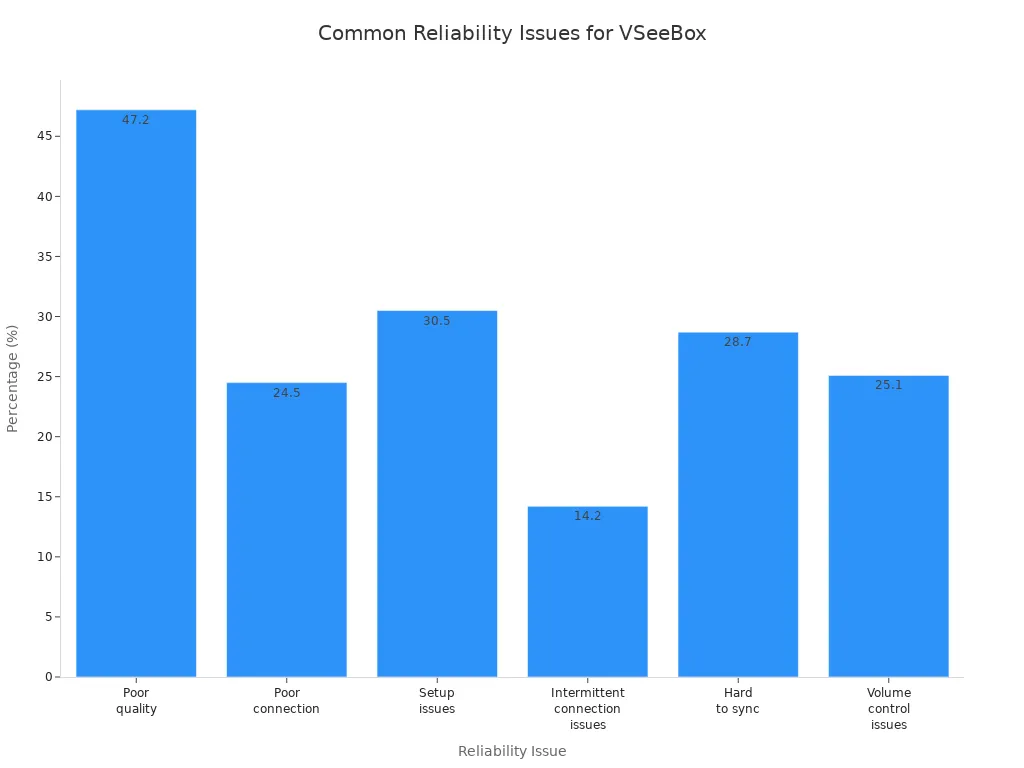
Here is a table that shows the most common problems reported by long-term users:
Reliability Issue | Percentage |
|---|---|
Poor quality | 47.2% |
Poor connection | 24.5% |
Setup issues | 30.5% |
Intermittent connection issues | 14.2% |
Hard to sync | 28.7% |
Volume control issues | 25.1% |
You can see that poor quality and setup issues happen often. Some users also report trouble syncing or controlling the volume. The chart below gives you a clear view of these problems:
If you want to avoid these problems, keep your device updated and check your internet connection. Using a wired connection can help make streaming more stable.
Customer Service
Good support makes a big difference when you use a streaming device. Vseebox offers customer service through email and live chat. Many users say the team answers questions quickly. You can get help with setup, connection, or subscription problems. The support team can guide you if your box has trouble or if you need to reset it.
Some users wish for faster replies during busy times. You may need to wait a bit longer for answers on weekends. Still, most people find the help useful and friendly. If you have a problem, you can reach out and expect clear steps to fix it.
Tip: Save your order number and device details. This helps the support team solve your problem faster.
Legality & Safety
Legal Considerations
You might ask if using VSeeBox is allowed where you live. The laws about streaming and iptv devices are different in each country. Some places have tough rules about copyright and sharing content. If you use apps that show copyrighted stuff without permission, you could be breaking the law. Always check your local rules before you use any iptv service.
Here is a table that lists the main legal risks:
Legal Risk | Description |
|---|---|
Installing copyrighted content redistribution apps without authorization may breach local laws. Users must ensure compliance with intellectual property regulations in their jurisdiction. |
Courts have sometimes ruled against companies selling streaming boxes with illegal content. For example, Dragon Box and TickBox TV had to pay a lot of money. These cases show that selling or using devices for illegal streaming can cause big problems.
Case Name | Outcome | Key Details |
|---|---|---|
Dragon Box | Sold devices with unauthorized access to copyrighted content. Court rejected 'empty platform' defense. | |
TickBox TV | $25 million in damages | Faced legal action for similar reasons. |
Note: You should only use VSeeBox for legal streaming. Always follow your local laws so you do not get in trouble.
Security & Privacy
You want your data to stay safe when you use any streaming box. VSeeBox uses security steps to keep your information safe from hackers and other dangers. The box protects your data from people who should not see it or change it. It only keeps your personal info as long as it needs for your account or subscription.
Here is a table that shows how VSeeBox keeps your privacy safe:
Security Measure | Description |
|---|---|
Data Security | VSeeBox implements appropriate security measures to protect user information from unauthorized access, alteration, disclosure, or destruction. |
Data Retention | The retention of personal information is based on factors such as account maintenance, service provision, legal obligations, and dispute resolution. |
Communication Security | Users are advised against using insecure channels for sending sensitive information, as no security measures are perfect or impenetrable. |
You should never send passwords or private details through unsafe ways. No device can promise perfect safety, but VSeeBox tries to keep your data safe. If you use iptv or any streaming service, always use strong passwords and update your box often.
If you want to keep your privacy safe, use secure networks and make sure your device software is up to date.
Pricing & Value
Cost Breakdown
You want to know how much you will pay for a vseebox. The price for a new VSeeBox V5 Pro is usually $499. You may find it for less if you buy in bulk, sometimes as low as $475. If you want extra features like a camera and mount, the price can go up to $549. Some people choose refurbished units, which cost between $375 and $425. You do not need to pay for a subscription to use the box. This makes it different from many other android tv box options.
MSRP for VSeeBox V5 Pro: $499
Bulk discount price: $475
Bundled with camera and mount: $549
Refurbished units: $375–$425
You get access to live channels and iptv features right away. You do not have to worry about hidden fees.
No-Contract Model
You do not have to sign a contract when you buy a vseebox. This gives you more freedom than contract-based streaming services. You can stop using the box any time you want. The table below shows how vseebox compares to contract-based services:
Feature | VSeeBox | Contract-based Services |
|---|---|---|
User Flexibility | High (no contracts) | Low (long-term commitments) |
Satisfaction | Enhanced (customizable viewing) | Variable (often tied to contracts) |
Financial Strain | None (no ongoing fees) | High (subscription fees) |
Content Library | Diverse (variety of options) | Limited (depends on package) |
User Interface | User-friendly (seamless navigation) | Complicated (multiple remotes) |
You can see that vseebox gives you more control and less stress about monthly bills. You get a wide range of content and a simple user interface.
Is VSeeBox Worth It
You want to know if vseebox is a good value. Many users like that you pay once for the box and do not need a subscription. You get a 30-day money-back guarantee if you keep the box in its original condition. The Elite Series does not have this refund policy. You also get a 1-year warranty, and you can ask for repairs after the warranty ends. If you want to return your box, you must contact customer service and pay for shipping.
30-Day Money-Back Guarantee (except Elite Series)
1-Year Warranty on all products
Post-warranty repair options
Customer pays return shipping
This review shows that vseebox gives you many live and on-demand features without extra costs. If you want a simple android tv box for streaming, vseebox can be a smart choice.
VSeeBox vs Alternatives
Comparison with FireTV & Others
You might want to know how VSeeBox compares to other streaming boxes. Many people look at Amazon Fire TV Stick 4K. Both devices let you watch 4K video and stream smoothly. Fire TV uses Fire OS and works well with Amazon apps. You often have to pay extra for shows or channels on Fire TV. VSeeBox uses Android 12 and gives you over 2,000 live TV channels. Most features do not need a monthly fee. This is good for people who want to stop paying for cable.
Here is a table that shows the main differences:
Brand | Main Product | 4K Support | Operating System | Key Features |
|---|---|---|---|---|
Amazon Fire TV | Fire TV Stick 4K | Yes | Fire OS | Amazon integration, subscription costs for content |
vseebox | vseebox Elite Ultra | Yes | Android 12 | 2,000+ live TV channels, no monthly fees, IPTV ready |
VSeeBox lets you do more things. You can add many apps and even install your favorites by hand. Fire TV is best if you already use Amazon a lot. VSeeBox gives you more choices for IPTV and shows from other countries.
Pros & Cons Summary
You should check the good and bad points before you pick a box. VSeeBox has strong hardware and supports new video formats. You can add lots of apps and use a remote app on your phone. The box is quiet and does not use much power. You also get USB ports for playing your own videos.
But, VSeeBox has some problems. It can be hard to get help if you live outside China. Some boxes come with extra apps you do not want or need updates from the seller. You do not get a voice assistant unless you add one yourself. There are also legal risks if you use IPTV streams that are not allowed.
Here is a summary table:
Advantages | Disadvantages |
|---|---|
Superior hardware | Risk of counterfeit units from unauthorized sellers |
Latest codec support (AV1, VP9 Profile 2) | Limited customer service outside China |
Flexible installation and sideloading | No built-in voice assistant |
Silent, fanless design | Firmware updates depend on seller |
Remote app for smartphones | Legal risks with unlicensed content |
Cost-effective compared to premium boxes | Some units ship with bloatware |
USB support for local media | Inconsistent quality control from third-party sellers |
If you want a box that saves money and lets you do more, VSeeBox is a smart choice. It is good for people who want to watch live and on-demand shows without a contract. If you want easy setup or strong support, you might like Fire TV or another big brand better.
You get strong value and easy streaming with vseebox. This box works well if you want many live channels and simple setup. You will like it if you want to avoid contracts and monthly fees. If you need top support or only use big brand apps, you may want another device. For most users, vseebox gives a good mix of features and price.
FAQ
How do you update your VSeeBox?
You can update your VSeeBox by going to the settings menu. Choose "System Update" and follow the steps on the screen. Updates help your device run better and fix bugs.
Is VSeeBox safe to use?
VSeeBox uses security features to protect your data. You should always use strong passwords and keep your device updated. Never share your private information with unknown apps.
Can you add more apps to VSeeBox?
Yes, you can install more apps from the Google Play Store or by sideloading APK files. This gives you more choices for streaming and games.
What should you do if VSeeBox buffers a lot?
Try these steps:
Check your internet speed.
Move your box closer to your router.
Use a wired connection if possible.
Lower the video quality in settings.
Does VSeeBox need a monthly subscription?
No, you pay once for the device. You do not need to pay a monthly fee to use the main features. Some extra apps may ask for their own subscriptions.